
LATEST NEWS
SUPER SUNDAY: FIFA Fiber vibes live hain aur STAR TS special campaign active hai. | MIDNIGHT TIMER: Star TS page par offer countdown midnight tak chal raha hai. | STAR TS OFFER: ₹1600₹1200 limited key offer (Signal). | 🆕 NAME UPDATE: TESLA software ka new name ab RANGER TS hai. | 🛒 BUY FLOW: Buy click → QR popup → verify ke last step par Signal open hoga. | 🎫 SUPPORT TICKET: Issue/Complaint/Suggestion ke liye Support Ticket page use karo. | ⬇️ DOWNLOAD PORTAL: All products ka dedicated download tatkalhub.xyz par. | 🚫 NOT WORKING: SpaceX & Starlink currently unavailable.
Future Connected

STARLINK
TATKAL SOFTWARE

The future of tatkal software. Experience satellite-speed booking with AI automation and web-based access.

Stellar Features

Next-gen tools for the modern agent.

Web Login Access

Flexible web-based login allowing you to book from any browser.

Payment Automation with AI

Smart AI handles OTPs and payment gateways for split-second transactions.

Free Training

Comprehensive video tutorials and guides included at no extra cost.

Instant Install

Get up and running in seconds with our automated installation process.

Quick Support

Rapid response team available to assist with any technical queries.

NOT WORKING

Starlink Basic

₹1500 ₹1700 / month
Offer price only on Signal purchase • Updates on WhatsApp channel
  • Web Based Login
  • Any Browser Access
  • AI Payment Automation
  • 1 Month Validity
BUY ON SIGNAL (OFFER)
CONSTELLATION

Combo VPS Pack

₹3200 / month

Includes High-Speed VPS Server

  • All Basic Features
  • Zero Latency VPS
  • Pre-installed Setup
  • Priority Support
BUY NOW
ORBIT MODE

IP Combo

₹2300 / month
  • Starlink License
  • Private Residential IP
  • Anti-Ban Protection
  • Secure Login
BUY NOW
Getting Started

How to Install

Follow these simple steps to start booking in minutes.

1

Download & Extract

Download the Starlink software zip file from your dashboard and extract it to your desktop.

2

Login with Token

Open the application and enter your unique license token provided in the email.

3

Configure & Book

Set up your passenger details and payment preferences. You are now ready to fly!

Pre-Booking Mandatory Steps

Smooth Tatkal Booking Guide

Starlink is updated based on current IRCTC behavior and common peak-time issues. Follow these steps for a faster, more stable Tatkal workflow:

🛠️ Pre-Booking Preparation

Ready Setup (Before Tatkal Window)

Credentials ready
Keep your username and password ready (clipboard or pre-filled where appropriate).
AC Classes
10:00 AM
Run your login process at this exact time.
Sleeper Class
11:00 AM
Click the sign-in button at this exact time.
🚀 Performance Benefit

Less Errors, More Success

Following the optimized timing helps reduce common peak-time issues like “Session Time Out” and “Server Busy” and keeps the transaction smoother.

Timing follow = smooth booking
Visual Guide

Starlink Pre-Booking Flow

Use this diagram to remember the steps quickly—especially when the Tatkal window opens.
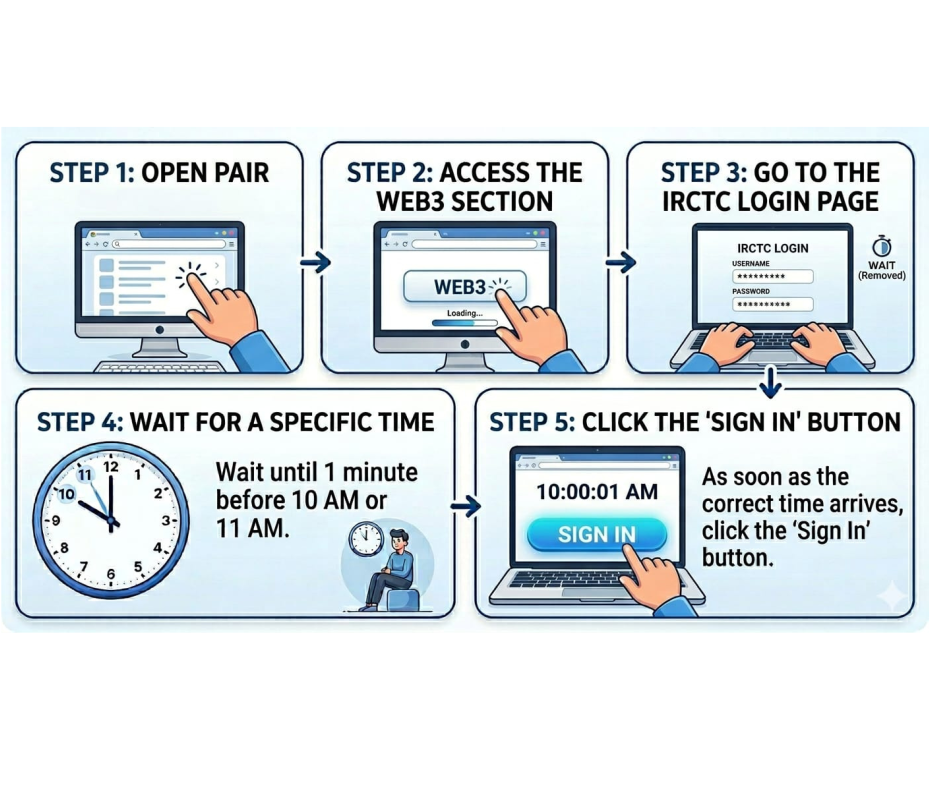
Starlink pre-booking mandatory steps guide
Video Guide
Watch on YouTube
Starlink (Avenger) Guide

Software Update & Usage Guide

For fast booking, use the right gateway, a stable device setup, and a clean login flow.

✅ Best Gateway

Payment Priority

1
Use E‑Wallet (recommended).
2
Paytm QR can also be used.
3
PhonePe QR is supported as well.
💻 Best Result Tips

Stable Setup

1
Use a normal PC setup (stable environment).
2
Open the menu and configure Browser Settings (Slot 1–4) once.
One-time setup = daily speed
🔐 Booking Process

Correct Login Flow

1
Use Form Login only.
2
Enter your User ID & Password and log in.
3
The rest is handled automatically by the software.
⚠️ Important Note
Web2 & Web3 Update

The Web2 & Web3 approach first arrived in the Avenger (Starlink) workflow. For the latest official updates, follow the community channels.

Starlink remains a strong choice for a web-login based workflow.
Performance typically improves when IRCTC is stable during the peak window.

Join the Community

User Control Center

Your Command Center

Manage your licenses, load wallet balance, and access training videos from one powerful dashboard.

Instant Wallet

Add funds instantly via UPI for seamless license purchases.

Auto Resets

Reset your key instantly without waiting for support.

History

Track all your purchases and activations in real-time.

Training

Access exclusive video tutorials to master the software.

Starlink Tatkal Software: Web-Login Speed With Stability

Starlink is built for agents who prefer a web‑login based workflow and want reliable peak-time performance. The focus is on keeping the booking flow clean and repeatable—so your preparation remains consistent and your execution does not depend on last‑second manual actions.

In real Tatkal conditions, speed is only one part of the result. Stability matters just as much: the browser environment, network latency, and how smoothly your session stays active under heavy traffic. Starlink is a strong fit when you want guided usage, a practical booking guide, and a workflow that can be repeated daily by individuals or small teams.

If you are comparing tools, Starlink is ideal when you want a web‑login flow with dependable execution at peak time. For best results, pair it with Tatkal VPS to reduce latency and Proxy/IP to keep your network identity consistent during rush minutes.

Best For
  • Agents who prefer web‑login based workflow
  • Peak time speed with a stable setup
  • Repeatable daily booking process
Booking Guide

Starlink Booking Guide & FAQ (2026)

Simple steps + common fixes to book Tatkal ticket fast with a stable setup.

Before Tatkal Time

  • Login 5–10 minutes early and keep only required tabs.
  • Keep passenger details and payment method ready in advance.
  • Use a stable internet + avoid background downloads.

Speed & Stability Boost

Recommended combo for peak time performance:

FAQ

What type of software is Starlink?

Starlink is a web‑login based Tatkal booking software designed for speed and a stable booking flow.

What if IRCTC login/session issues happen?

Login early, keep the browser clean, disable unnecessary extensions, and use a VPS at peak time.

Where can I get support and updates?

Join Telegram and WhatsApp Channel for updates.

Terms/Privacy/Refund policy?

Please read Terms, Privacy, and Refund Policy before purchase.